

Step 19 - Set Function Key APIM - Build
- 18 Nov 2019
- 1 Minute to read
- Contributors

- Print
- DarkLight
- Download PDF
Step 19 - Set Function Key APIM - Build
- Updated on 18 Nov 2019
- 1 Minute to read
- Contributors
- Print
- DarkLight
- Download PDF
Article summary
Did you find this summary helpful?
Thank you for your feedback!
In this task we will setup another key on the function app. This time the key will be used by APIM in the policy to inject the x-functions-key HTTP header so that APIM can forward calls on to the function app.
We will use the Azure CLI task in v2 (preview) and again with a Powershell script.
You can read more about setting up function keys - Click Here
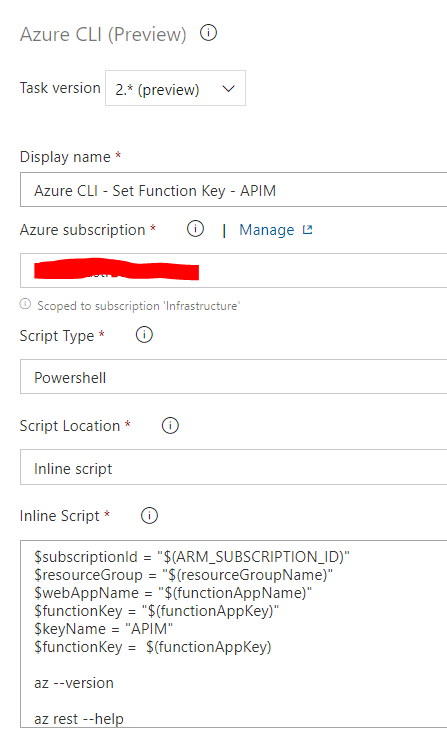
A picture of the configuration of this task can be seen below:
YAML
The below code shows the yaml for this task:
variables:
  ARM_SUBSCRIPTION_ID: '[TBC]'
  resourceGroupName: '[TBC]'
  functionAppName: '[TBC]'
  functionAppKey: '[TBC]'

steps:
- task: AzureCLI@2
  displayName: 'Azure CLI - Set Function Key - APIM'
  inputs:
    azureSubscription: '[TBC]'
    scriptType: ps
    scriptLocation: inlineScript
    inlineScript: |
     $subscriptionId = "$(ARM_SUBSCRIPTION_ID)"
     $resourceGroup = "$(resourceGroupName)"
     $webAppName = "$(functionAppName)"
     $functionKey = "$(functionAppKey)"
     $keyName = "APIM"
     $functionKey =  $(functionAppKey)

     az --version

     az rest --help

     $resourceId = "/subscriptions/$subscriptionId/resourceGroups/$resourceGroup/providers/Microsoft.Web/sites/$webAppName"

     Write-Host "Resource Id = " $resourceId


     #List Keys
     #=========
     Write-Host 'Checking updated keys'
     $output = az rest --method post --uri "$resourceId/host/default/listKeys?api-version=2018-11-01"

     Write-Host $output
     $LastExitCode
     if (!$?) {
         Write-Error "Error listing keys 1"
         return
     }

     #Delete Existing key
     #===================

     Write-Host 'Deleting existing key'
     $output = az rest --method delete --uri "$resourceId/host/default/functionkeys/$($keyName)?api-version=2018-11-01"

     Write-Host $output
     $LastExitCode
     if (!$?) {
         Write-Error "Error deleting key"
         return
     }


     #Add new Key
     #===========

     $payload = (@{ properties=@{ name=$keyName; value="$functionKey" } } | ConvertTo-Json -Compress).Replace('"', '\"')

     Write-Host "Payload = " $payload

     Write-Host 'About to put new key in Azure'
     $output = az rest --method put --uri "$resourceId/host/default/functionkeys/$($keyName)?api-version=2018-11-01" --body "$payload"

     Write-Host $output
     $LastExitCode
     if (!$?) {
         Write-Error "Error adding key"
         return
     }


     #List Keys
     #=========
     Write-Host 'Checking updated keys'
     $output = az rest --method post --uri "$resourceId/host/default/listKeys?api-version=2018-11-01"

     Write-Host $output
     $LastExitCode
     if (!$?) {
         Write-Error "Error listing keys 2"
         return
     }


    powerShellErrorActionPreference: continue
    addSpnToEnvironment: true
    powerShellIgnoreLASTEXITCODE: true
Was this article helpful?